Why your Instagram export must use the All time date range
Instagram's export defaults to “Last year”, which quietly truncates your followers list and makes hundreds of real followers look like non-followers. What happens, how to spot it, and how to fix it.
By FindUnfollower · · 3 min read

The single most common reason for “my numbers look wrong” is a setting most people never notice: the date range on Instagram's export screen. It defaults to Last year, and that default breaks follower analysis in a subtle way.
What “Last year” actually does
Instagram filters the export by the date each relationship was created. Your following list is usually complete anyway, because Instagram keeps that history and most of it predates the cut-off in a way the filter does not remove. But your followers list only includes people who followed you within the last twelve months. Everyone who followed you earlier disappears from the file.
On a real account we tested, the following list went back to 2014 while the followers list stopped exactly one year before the export date. The result was 832 apparent non-followers where the true number was a small fraction of that.
How to spot a truncated export
Your non-follower count is suspiciously close to your following count.
Close friends who definitely follow you show up as non-followers.
The HTML files in the export say “Contains data that you requested from <date> to <date>” with a one-year span.
In a JSON export, the oldest follower timestamp is implausibly recent for the age of your account.
FindUnfollower checks both of those signals when it reads the file. If either fires, you see a warning before any numbers, with the choice to continue anyway or to re-request the export.
How to fix it
In the Instagram app go to Accounts Centre → Your information and permissions → Export your information → Create export.
Choose your profile and Export to device; under Customise information tick only Followers and following.
Open Date range and pick All time.
Start the export, wait for the email, and upload the new ZIP.
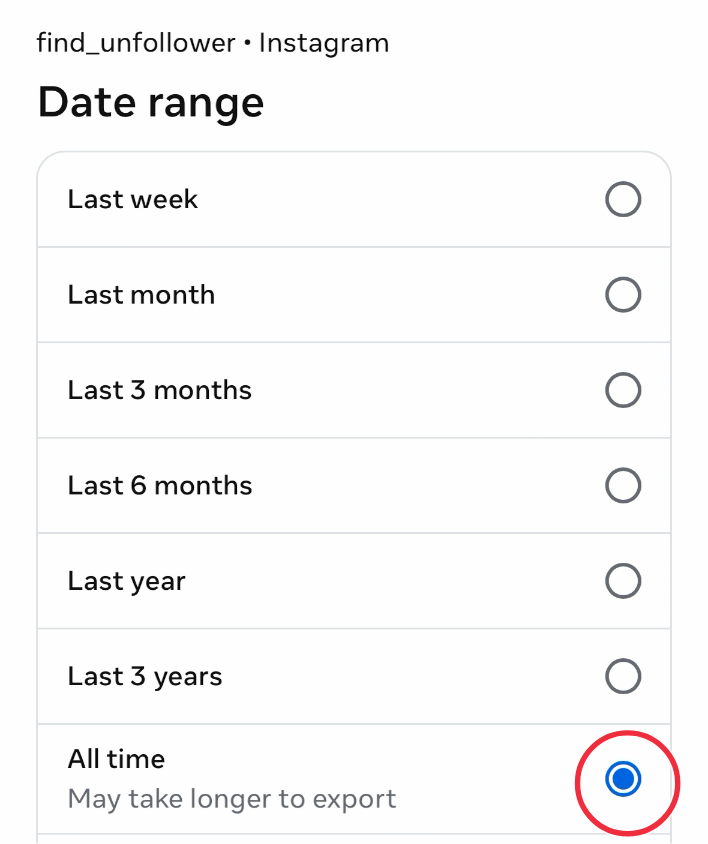
The setting to change. Every other option is a truncated view of your followers.
The new snapshot becomes your baseline, so your first real unfollower comparison starts from complete data. The complete screen-by-screen guide is how to download your Instagram data.
Why it matters even more for unfollower tracking
Non-followers are computed from one export, so a truncated file inflates one number. Unfollowers are computed by comparing two exports, so mixing a truncated file with a complete one produces nonsense in both directions: long-time followers missing from the Last-year file look like new followers when they reappear in an All-time file, and the other way round. FindUnfollower limits the comparison to the window both exports can actually see, which prevents false unfollowers, but it cannot invent the names the truncated file left out. Consistently choosing All time removes the problem entirely. Non-followers vs unfollowers explains the two calculations.
If you already uploaded a Last-year export
Nothing is lost. Request a new export with All time and upload it; it replaces the truncated snapshot as your baseline and the numbers correct themselves. Your Viewed marks and whitelist carry over.


