Follower Checker for Instagram: How to Check Safely
A follower checker compares your followers and following lists so you don't have to guess from two numbers. Here is what each kind of check answers, how to run one without sharing your password, and how to read the results.
By FindUnfollower · · 10 min read

You know the number at the top of your Instagram profile. But what does it actually tell you? Not whether the people you follow are following you back. Not who quietly disappeared from your followers list last week. And definitely not why your follower count went down.
That's where a follower checker for Instagram can help. The useful ones compare your followers and following lists instead of asking you to guess from two numbers. But different checkers answer different questions, and some ask for more access to your account than they need.
Here's how to get the answers you're looking for without handing over your Instagram password.
The quick answer: If you only want to check one person, search for their username in your Instagram followers list. If you want to compare everyone, download your Followers and following data from Instagram and use a file-based checker such as FindUnfollower. Your first export can show who doesn't follow you back; a later export can show who stopped following you between checks.
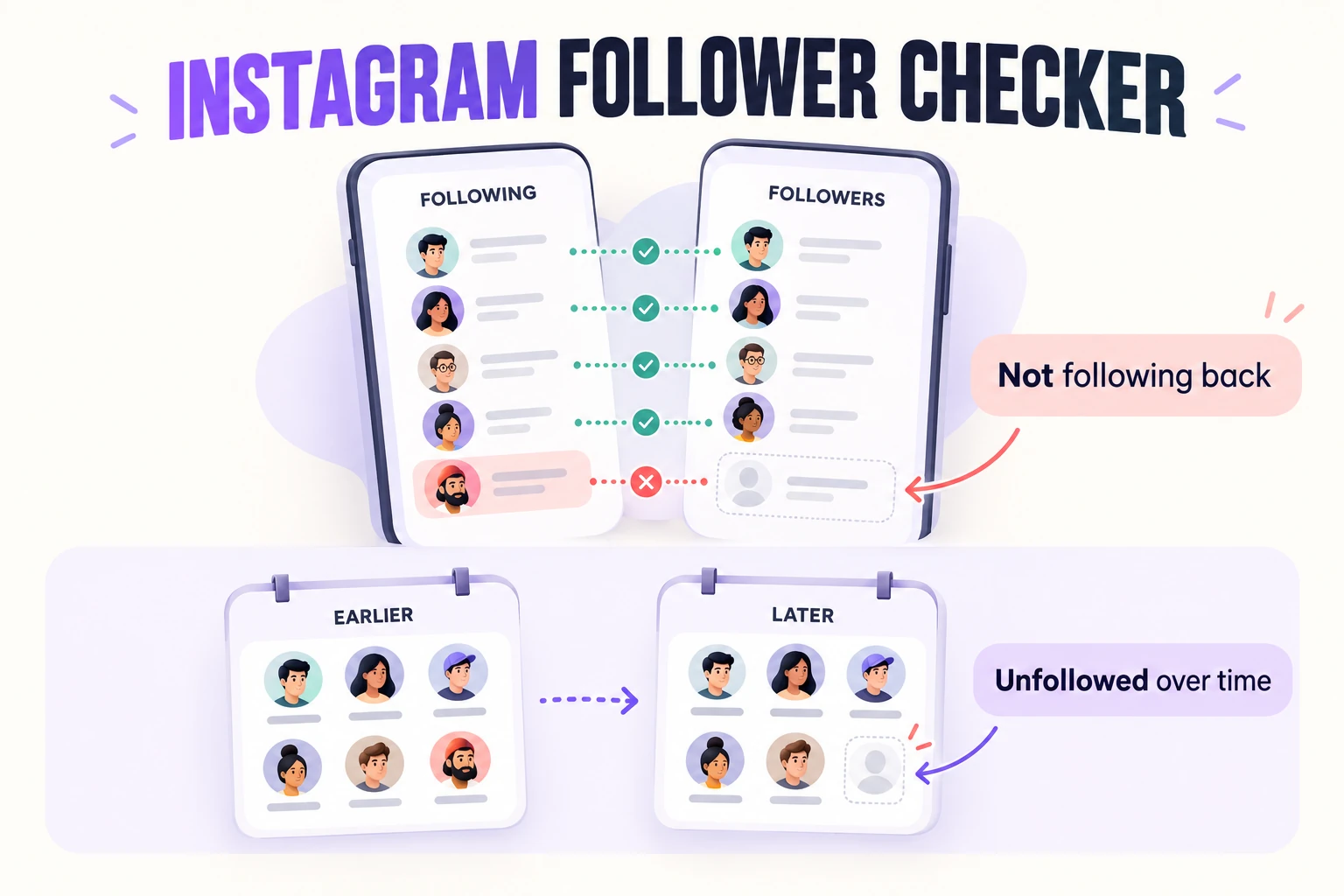
One follower list shows where things stand now. Comparing two lists from different dates reveals what changed.
What does an Instagram follower checker actually check?
Despite the name, a follower checker isn't one single feature. People usually want one of four answers:
Not following you back: accounts you follow that aren't in your followers list.
Followers you don't follow back: people who follow you, but you haven't followed them (FindUnfollower calls these fans).
Mutual followers: accounts where you follow each other.
Unfollowers: accounts that appeared in an earlier followers list but are missing from a newer one.
The last one is different. Someone who doesn't follow you back may never have followed you in the first place. An unfollower is someone whose follower relationship changed between two checks.
For example, a musician you follow who has never followed you back belongs on your not following back list. A friend who followed you last month but is absent from this month's list is a potential unfollower. Same-looking result today, different history.
If you're curious about that distinction, we've explained it in more detail in non-followers vs. unfollowers.
Three ways to check your Instagram followers
1. Check one account inside Instagram
For one or two people, you may not need a tool at all. Open your own followers list and search for the account's exact username. If they're there, they follow you. If you follow them but they don't appear in your followers list, they aren't following you back at the time you check.
This works well when you have a particular person in mind. It gets tedious when you're following hundreds of accounts, and it won't give you a saved comparison for next month.
2. Download your lists and compare them yourself
Instagram lets you request a copy of your account information through Meta's Accounts Center. Among the available categories are your followers and following lists. You can compare the usernames in a spreadsheet: accounts present in following but absent from followers are not following you back.
This method gives you control over the data and doesn't require a third-party login. The trade-off is a little manual work, especially when the files need to be cleaned up before you compare them.
3. Use a checker that reads Instagram's export
A file-based follower checker does the list comparison for you. You download your data directly from Instagram, then upload the export to a service that can read it.
FindUnfollower works this way. It doesn't ask for your Instagram credentials or log in to your account. It uses the followers-and-following data you choose to upload to show non-followers, mutuals and other follower relationships. When you return with a newer export, it can compare the snapshots to identify changes.
That's different from tools that ask for your Instagram password or try to automate actions on your account. You don't need to grant that kind of access just to compare two lists.
How to use a follower checker for Instagram, step by step
The first check has a few extra steps because Instagram needs to prepare your export. After that, you're simply repeating the same process whenever you want an updated comparison.
Open Instagram's Accounts Center. From your profile, open the menu, then go to Accounts Center → Your information and permissions → Export your information. Instagram sometimes changes the menu wording.
Create an export for your Instagram account. Choose to export to your device and select only Followers and following under the information categories. You don't need your messages, photos or stories for this.
Set the date range to “All time.” This matters. A shorter period can leave older follower relationships out of the file and make the comparison misleading.
Download the ZIP file once Instagram has prepared it. FindUnfollower supports Instagram's HTML and JSON export formats, so you don't need to convert it.
Upload the ZIP to FindUnfollower. Your browser extracts the relevant followers-and-following files for analysis. Review your results, and repeat with a fresh export later if you want to track changes.
For screenshots of the current Instagram menus, use our separate guide to downloading your Instagram followers and following data.
A note on the free check: FindUnfollower lets you get started for free, but the free plan reveals only the first three accounts that don't follow you back on each check. Full lists and ongoing unfollower tracking are paid features. It's better to know that before you start.
How to read your results without jumping to conclusions
Let's say you follow 600 accounts and have 550 followers. It's tempting to look at those two numbers and think, “So 50 people don't follow me back.” But that isn't how it works.
Imagine that 420 accounts are mutual followers. That leaves:
RelationshipAccounts You follow each other420 You follow them; they don't follow you back180 They follow you; you don't follow them back130
Both totals still add up: you're following 420 + 180 = 600 accounts, and 420 + 130 = 550 accounts follow you. The difference between the two headline counts tells you almost nothing about exactly which relationships aren't mutual.
A follower checker compares actual usernames, which is why it can answer the question properly.
It also helps to look at who is on each list, not just how long the list is. News outlets, celebrities, shops and public figures often won't follow back. That doesn't mean they've unfollowed you, or that you should stop following them. The whole point is having the information to make your own call.
Can a follower checker tell you who unfollowed you?
Yes, but only when there's an earlier list to compare against. One export tells you who follows you at that moment. To detect unfollowers, you need another export from a later date.
Here's a simple example: your follower count goes from 420 to 415. That doesn't necessarily mean five people unfollowed you. You might have gained four new followers and lost nine existing ones. By comparing the two username lists, a checker can separate the gains from the losses.
There are limits. It can't reliably tell you the exact moment someone unfollowed between exports. If someone unfollows and follows again before your next export, that brief change won't appear. And no honest checker can reconstruct a full history from before it had your earlier follower data.
For more on this, see how to see who unfollowed you on Instagram.
What makes an Instagram follower checker worth trusting?
Before you upload anything or sign up, ask a few straightforward questions.
Does it need my Instagram password? Comparing a file that Instagram gives you doesn't require your password. Be wary of tools that request your credentials or promise to mass-unfollow people on your behalf.
Does it explain where the data comes from? A trustworthy checker should be clear about whether its information is a saved snapshot, a recent export or something else. “Live unfollower history” sounds impressive, but it isn't a substitute for explaining the method.
What does it keep? Even a follower export contains real account usernames. Read the privacy policy and look for specific answers about uploads, retention and deletion. FindUnfollower deletes a raw upload as soon as it has been read successfully, and keeps the usernames needed for your results and future comparisons; the details are in the Privacy Policy. That's more precise than claiming your data is never stored.
What is actually free? “Free follower checker” can mean a limited preview rather than access to every result. Check the limits before investing time in an export.
Can I act on the results myself? A read-only tool lets you decide what to do. You can review an account inside Instagram before unfollowing anyone; there's no need to give an app permission to do it for you.
Why your follower check might look wrong
If your results seem surprising, don't immediately assume half your friends unfollowed you. Check these possibilities first:
Wrong export date range. If you selected “Last year” instead of “All time,” older follower entries may be missing. This can make genuine followers look like non-followers. Read why the “All time” setting matters.
An older snapshot. The result reflects when Instagram prepared the export, not necessarily what changed five minutes ago.
A pending follow request. Requesting to follow a private account doesn't mean you're following it yet.
An account that disappeared. A removed, deactivated or blocked account can be missing from a later export. That absence alone doesn't establish the person's intent.
A good rule: use a checker to narrow down what changed, then verify anything important directly in Instagram before drawing conclusions.
How often should you check?
For most personal accounts, once a month is enough to get a useful picture without turning it into a habit of monitoring every small change. If you're actively cleaning up your following list, a weekly comparison can make changes easier to spot.
Checking more often won't explain why someone unfollowed. It simply gives you a narrower window between snapshots. If you're managing a creator or business account, treat follower changes as one piece of information alongside content performance and engagement, not as a verdict on a single post.
Frequently asked questions
Is there a built-in follower checker on Instagram?
Instagram shows your followers and following lists, and you can search for individual accounts. It doesn't provide a single built-in comparison report showing everyone who doesn't follow you back.
Can I use a follower checker for Instagram without logging in?
Yes. With an export-based checker, you download the files from Instagram while signed in to Instagram itself, then upload them separately. You don't give the checker your Instagram password. A service may still ask you to create its own account to save results.
Is FindUnfollower free?
The free plan shows your counts and reveals the first three accounts that don't follow you back on every check. Seeing complete lists and using ongoing unfollower tracking requires a paid plan; see pricing.
Can I find out who unfollowed me before my first check?
Not reliably. Without a saved earlier followers list, a checker can't know which people used to follow you. Your first export establishes a starting point for future comparisons.
Does a follower checker detect bots or fake followers?
Not simply by comparing follower lists. It can tell you which usernames are in each list, but that alone doesn't prove an account is fake, inactive or a bot. Be skeptical of tools that claim otherwise without explaining their evidence.
Check your Instagram followers without handing over your account
You shouldn't have to give a random app your password just to answer a simple question about your own followers. Start with Instagram's own export, compare the lists, and decide for yourself what to do with the results.
Start a free follower check with FindUnfollower →
FindUnfollower is an independent service and is not affiliated with Instagram or Meta.


